Formuliermet Helpdesk & inbox

Your form as a helpdesk

Customer questions no longer get lost in your personal inbox: every form gets its own email address and a shared inbox. Replying, following up and wrapping up — all neatly attached to the submission.

In short

What this handles for you

Your own address per formReplies from respondents automatically land in the right inbox.
Linked to the submissionWith every conversation, you instantly see the matching submission in a quick-view.
Two-wayReceive and reply to email from the platform — the customer notices no difference.
Mailboxes & foldersOrganize conversations per form, with folders and a trash bin.
Your whole team can follow alongOne shared inbox instead of ten separate mailboxes.
Clean email threadsReplies reach the customer as an ordinary email, in the same conversation.
Helpdesk & inbox

All communication in one place

A customer replies to their confirmation email? That reply shows up in your inbox, linked to the original submission. You reply from the platform, and the customer simply receives a neat email.

  • Inbox per form or account-wide — you choose the overview.
  • Submission quick-view next to the conversation: all context within reach.
  • Folders & trash to tidy up handled conversations.
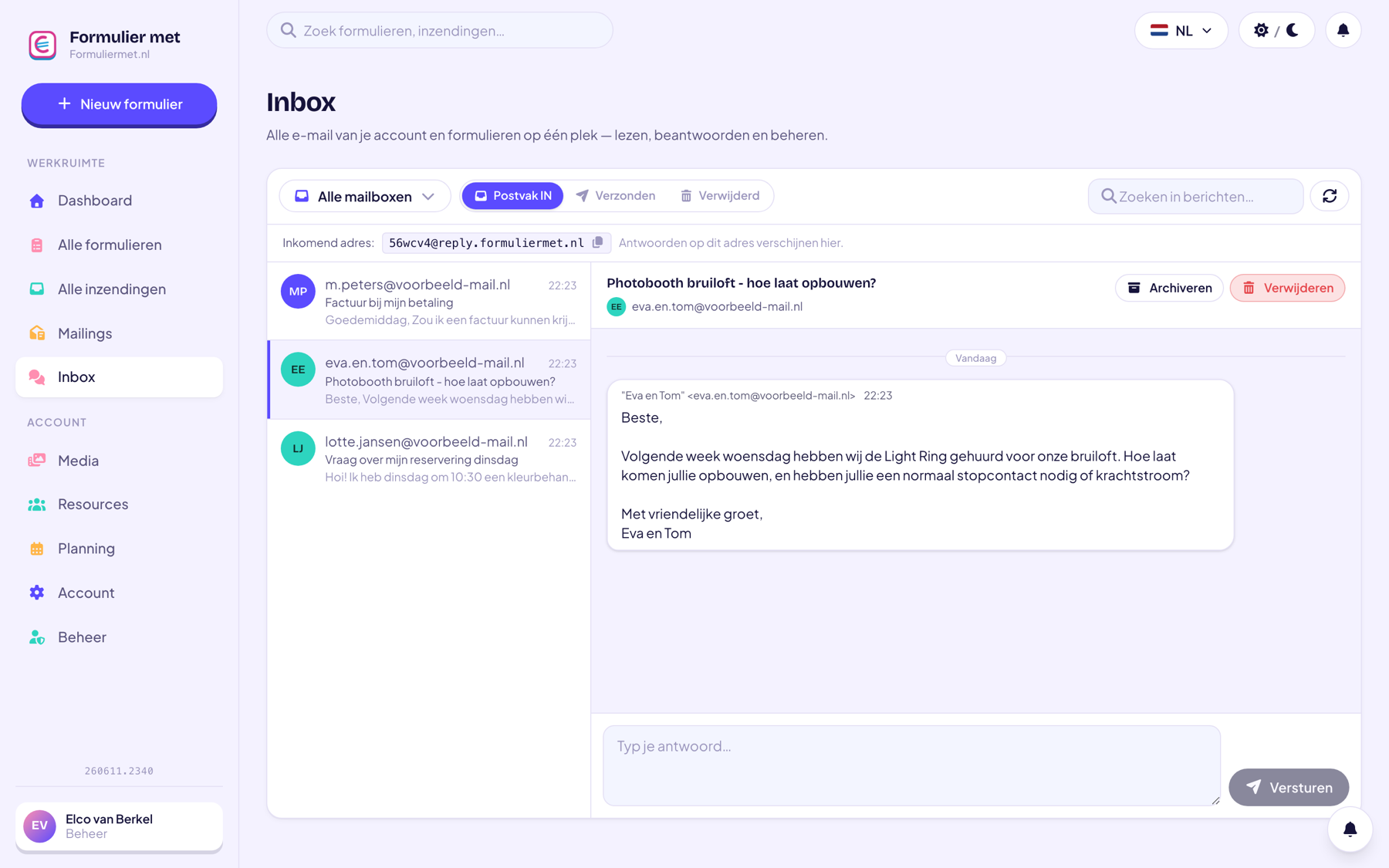
app.formuliermet.nl/inbox
The shared inbox with conversations per form
Seamless for the customer

The customer just emails — you stay organized

Customers send and receive perfectly ordinary emails; they won't notice a 'helpdesk' at all. Behind the scenes, everything comes together in your inbox, linked to the right submission and sent from your own sender address.

  • Replies arrive as an ordinary email for the customer, in the same thread.
  • Automatically linked to the submission, with a quick-view of the details alongside.
  • Bounces and spam are processed; you tidy up with folders and a trash bin.

Or let the AI assistant do it

Read and answer your inbox with help from the assistant.

“Read the newest question in the inbox”“Answer this question with a friendly explanation”“How many open messages are there?”
Discover the AI assistant
How it works

Your helpdesk in 3 steps

01

Turn on the inbox

Available from the Medium package. Every form gets its own reply address.

02

Receive questions

Replies to your form emails and new questions land in the inbox automatically.

03

Answer & wrap up

Reply from the platform, with the submission alongside. Done? Archive the conversation.

Who it’s for

Widely used by

For anyone who gets questions about orders, bookings or sign-ups.

Combine with

Related features

Everything works together in the same form — combine whatever you need.

FAQ

Questions about helpdesk & inbox

Which package includes the helpdesk inbox?

The inbox is available from the Medium package.

Does the customer see that I'm using a 'helpdesk'?

No. The customer sends and receives ordinary emails in the same conversation — only you stay organized by working from the platform.

Can I link emails to a specific submission?

That happens automatically: replies to form-related emails are linked to the right submission, with a quick-view of the details next to the conversation.

What happens with spam or bounces?

The platform handles bounces automatically (failed deliveries are flagged and suppressed) and you can move unwanted conversations to the trash.

Bring calm to your mailbox

One inbox for all form communication, with the submission always right beside it.